Price first. Visit later.
The design language for our heat-pump buy flow: nine steps, twenty named components and one visual system. Taken from Jetson's intake and Tesla's order pages, bent for HVAC.
The flow we adopt
One promise: your real price, before anyone visits. The address starts a price; every later step makes it more certain; the number never leaves the screen.
Jetson sells "1. See your price. 2. Upload a few photos. 3. Choose your install date" and asks only for an address up front. Tesla keeps the whole order on one page with a sticky price and takes a small refundable deposit. We take Jetson's low first ask and Tesla's always-visible price, and move the heavy questions (photos, panel, nameplate) after the deposit.
Jetson facts come from our own captures of jetsonhome.com on 2026-10-27 (phone 390 wide at 2x, desktop 1440). We stopped the intake at the address step so we never created a contact record. Tesla facts come from a live accessibility-tree read of tesla.com/modely/design on Jonathan's Mac (27 Oct 2026, cited as "Tesla live, AX read"; it outranks the rest where they disagree) and from secondary sources, since tesla.com is blocked from our server; each one is linked.
-
Address
- Change for HVAC
- Keep the single field and the three promises, but reword the third to the real promise: "Get a real price, not a visit." Pre-fill the utility from the address the way Tesla Energy does, so the rebate step already knows the programs. Create the record only after step two, not on suggestion pick.
- Ask for
- Street address (Places suggestion). Nothing else.
- Button
Where this comes from
Jetson's intake: the whole first step is one Google Places combobox under three check-marked promises ("Find your rebates and incentives / See a system tailored for your home / Get your free, upfront price"), with city, state and ZIP locked until a suggestion is picked and an "Edit full address details" expander. Picking a suggestion posts to the server at once. Source: jetsonhome.com/intake.

Jetson /intake, phone, empty state. jetsonhome.com/intake -
Home details
- Change for HVAC
- A heat pump needs a load, so we ask the six sizing facts here and keep photos for after the deposit. The "existing equipment" question becomes "What heats your home today: gas furnace / oil / electric baseboard / heat pump / none".
- Ask for
- Square feet, year built, heating fuel today, ducts yes/no, floors and zones, average monthly energy bill, existing AC yes/no. Photos (nameplate, panel, ductwork) come later as tasks.
- Button
Where this comes from
Tesla Energy asks almost nothing before the order: address, average monthly bill, product, and on the Powerwall path "Existing equipment: Solar / Powerwall / None". Bill upload, panel photos and the site survey are tasks after the deposit. Source: tesla.com how-to-order-solar-panels (Wayback). Jetson's step two is "Upload a few photos".
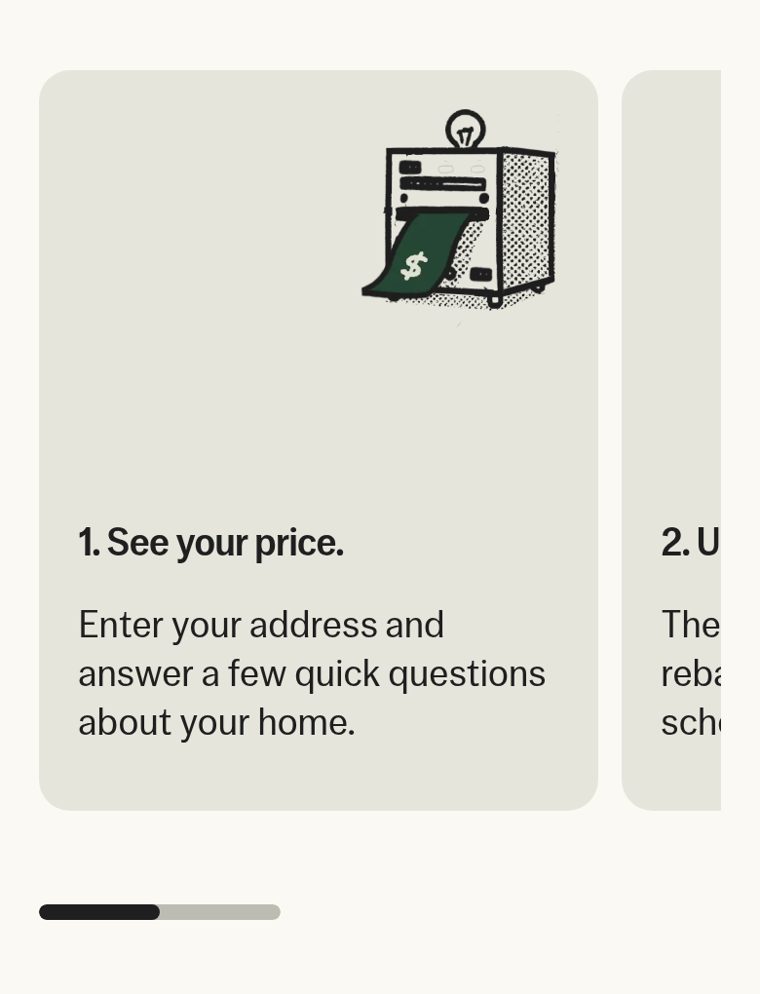
Jetson homepage, "Everything handled" step cards. jetsonhome.com/us/air -
Sizing recommendation
- Change for HVAC
- The recommendation is a Manual J-lite result stated in tons and BTU with the one-line reason ("2.5 tons for 1,800 sq ft in Denver, 1998, gas furnace, ducted"). The second card is "Plan for an addition, EV charger or ADU". No "Customize" slider: oversizing is the thing we are selling against.
- Ask for
- Future loads (addition, EV, ADU, finished basement). Optional.
- Button
Where this comes from
Tesla Energy's "Recommended" card against a "Plan for Future Use" card, each with its own $/mo, plus an "Edit" for future loads ("1 new EV") and a "Customize" row. Source: Electrek, 2025-10-03. Jetson's claim "Not oversized. Just the right size." (jetsonhome.com/us/air).
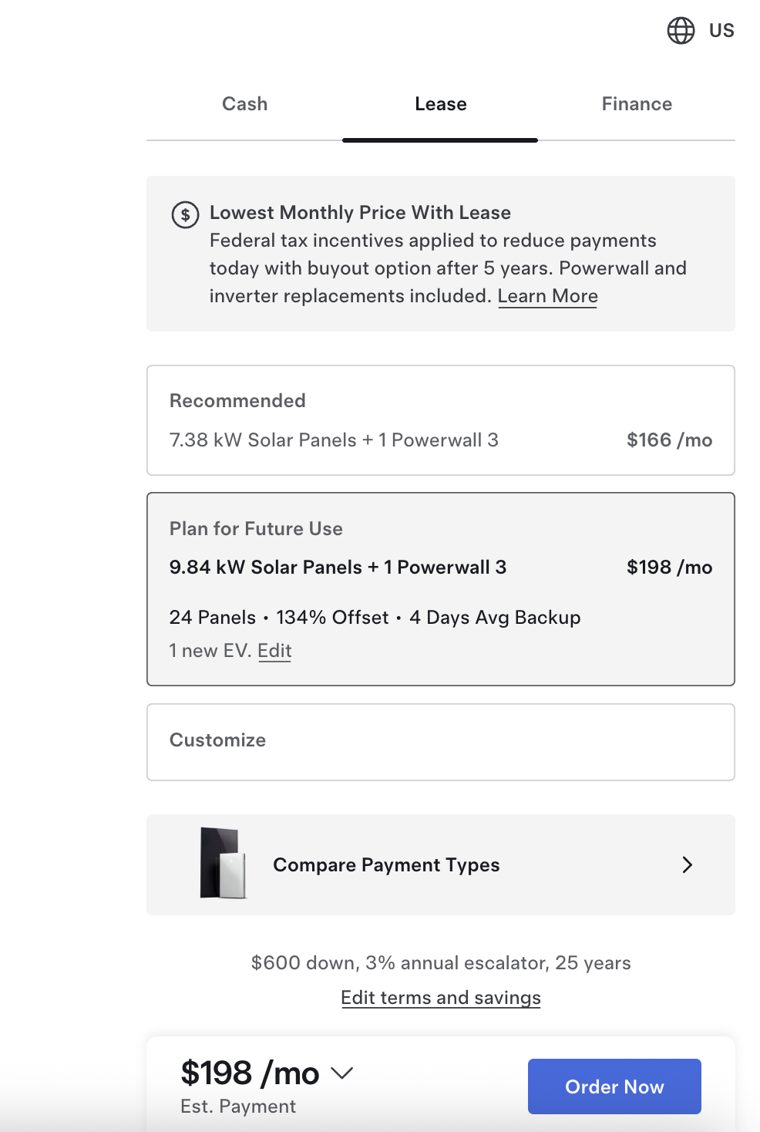
Tesla Energy design rail, Lease tab selected. electrek.co -
Options and add-ons
- Change for HVAC
- Three equipment tiers (Good, Better, Best) named by what changes: cold-climate rating, SEER2, sound, warranty years. Add-ons as a checklist with a price each: air purification, smart thermostat, humidity control, maintenance plan, panel upgrade if the sizing step flagged it.
- Ask for
- One tier. Any add-ons.
- Button
Where this comes from
Tesla's trim cards: each card carries its own price, or its own $/mo once a finance tab is selected, so the buyer compares deltas without arithmetic; accessories below are line items with an Add button. Source: r/TeslaModelY 1g881qs. Tesla live, AX read, 27 Oct 2026: add-ons are priced checkboxes in the rail (Wall Connector $585 "Installation required", Tow Hitch $1,000, accessories $30 to $500) and Full Self-Driving is a $99/mo subscription checkbox. Jetson's add-on is Jetson Care Plus (jetsonhome.com/us/care-plus).
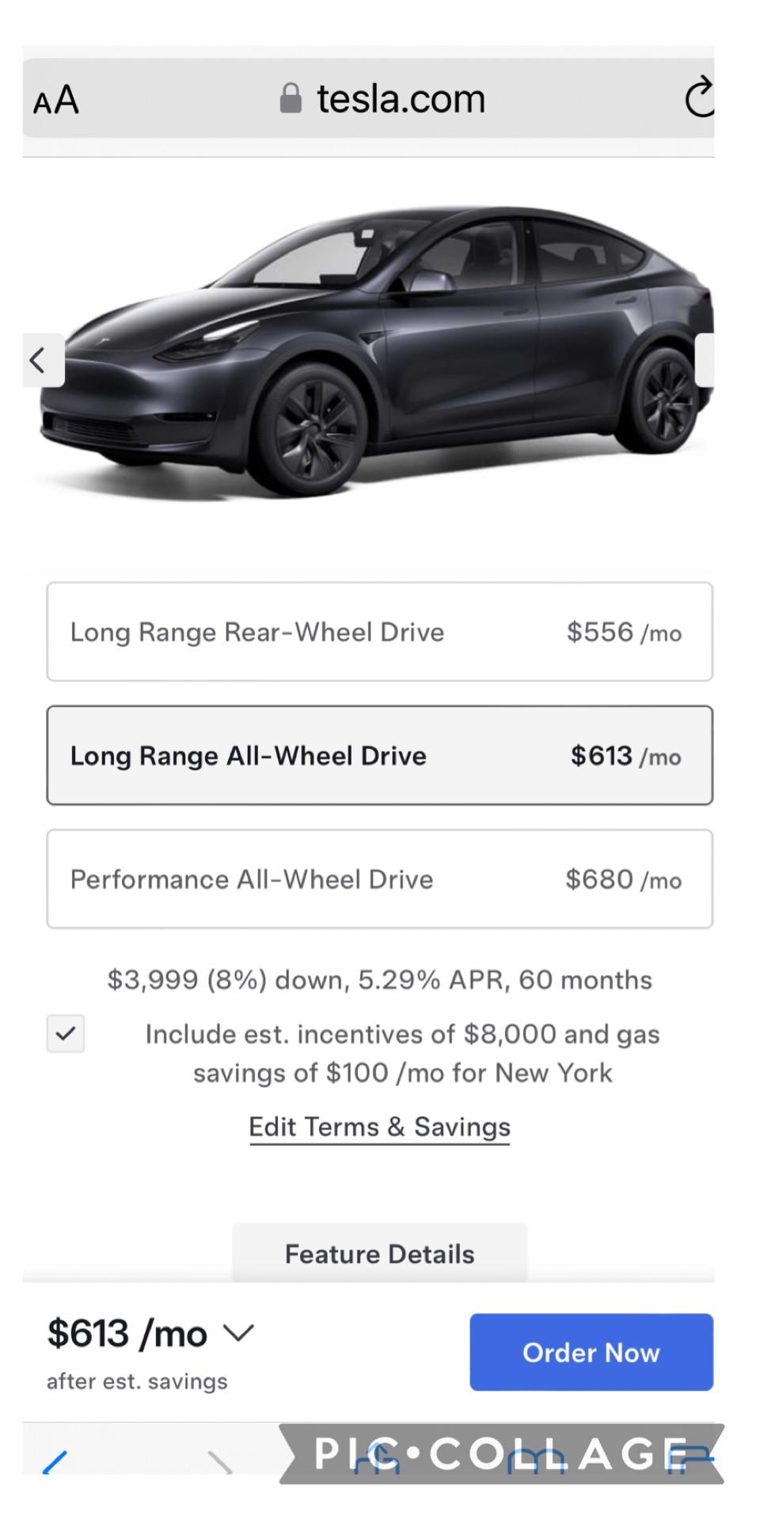
Model Y trim cards on the Finance tab. reddit.com r/TeslaModelY -
Rebates and incentives
- Change for HVAC
- Three named lines: federal 25C credit, HEEHRA rebate (income-qualified, marked "if eligible"), utility rebate from the pre-filled utility. Two totals, always both: the real price and "after incentives". Energy-bill savings are a separate opt-in checkbox and never mix into the payment figure (Tesla's "after est. savings" drew the complaints). We do not pre-check an income-qualified rebate the way Tesla pre-checks the state incentive: HEEHRA is unchecked until the buyer confirms the criteria.
- Ask for
- Household size and income band for HEEHRA, only if the buyer wants that line checked. Optional.
- Button
Where this comes from
Tesla Energy nets incentives as negative line items with their program name ("Solar & Powerwall Discount −$4,900") above a "Cash Price, taxes and fees not included". On the Model Y the incentive is a checkbox: Tesla live, AX read, 27 Oct 2026 shows a pre-checked "$3,500 Massachusetts Incentive" with a "View Criteria" link, netted into the monthly the bar shows ("$526 /mo after est. savings"), plus a separate "Up to $6,600 potential savings after delivery" button. The 2024 configurator had the same checkbox with gas savings folded in. Sources: r/TeslaSolar 1nuxczq, Teslarati, 2023-02;.
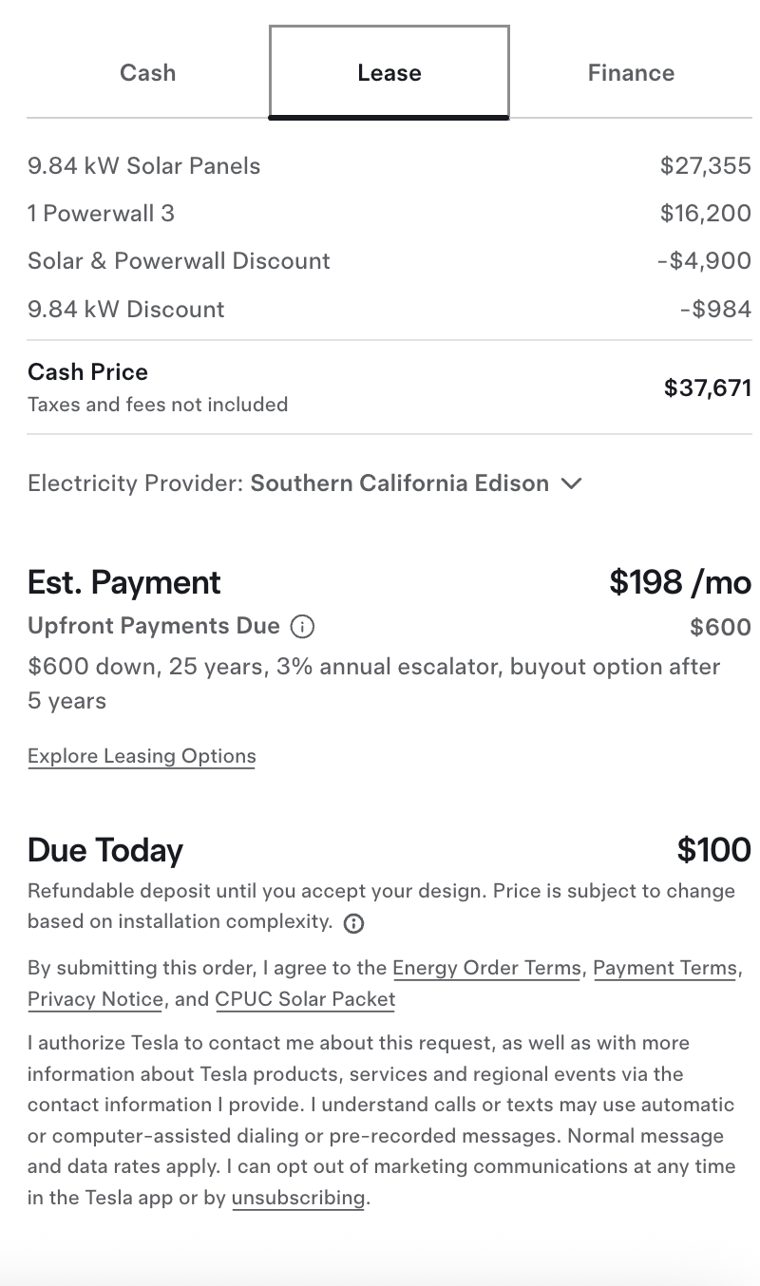
Tesla Energy breakdown and deposit copy. electrek.co -
Payment
- Change for HVAC
- Three segments: Cash, Finance, Lease-or-subscribe. Finance shows term and APR band and a down-payment slider; the monthly estimate changes as the slider moves. Lease captures the incentives for the owner and includes maintenance, the way Tesla's lease "builds in" the federal credit. No credit-tier question; a "Get prequalified" link is allowed as Tesla's side door (optional, soft pull, never a gate). The default segment is Finance when a promotional rate exists, otherwise Cash. The demo at the foot of this page is this step, working.
- Ask for
- Payment mode. For finance: down payment and term. Nothing about credit.
- Button
- (the label repeats the chosen mode)
Where this comes from
Tesla's Cash / Lease / Finance tabs at the top of the rail re-price every card at once; the monthly figure carries its assumptions inline ("$600 down, 3% annual escalator, 25 years") with an "Edit terms" link; "Compare Payment Types" opens a three-column sheet; APR is shown, never entered, and the credit application comes after the deposit. Tesla live, AX read, 27 Oct 2026: the tab group is Cash | Lease | Finance with Finance selected by default, every trim card priced monthly ($526/mo RWD), the terms line "2.49% APR, $2,750 down, 72 mo" with "Edit Financing", and two side-door buttons under the cards, "Get Trade-In Value" and "Get Prequalified". Secondary sources: r/TeslaSolar 1nuxczq, Model Y walkthrough, 2026-01;.
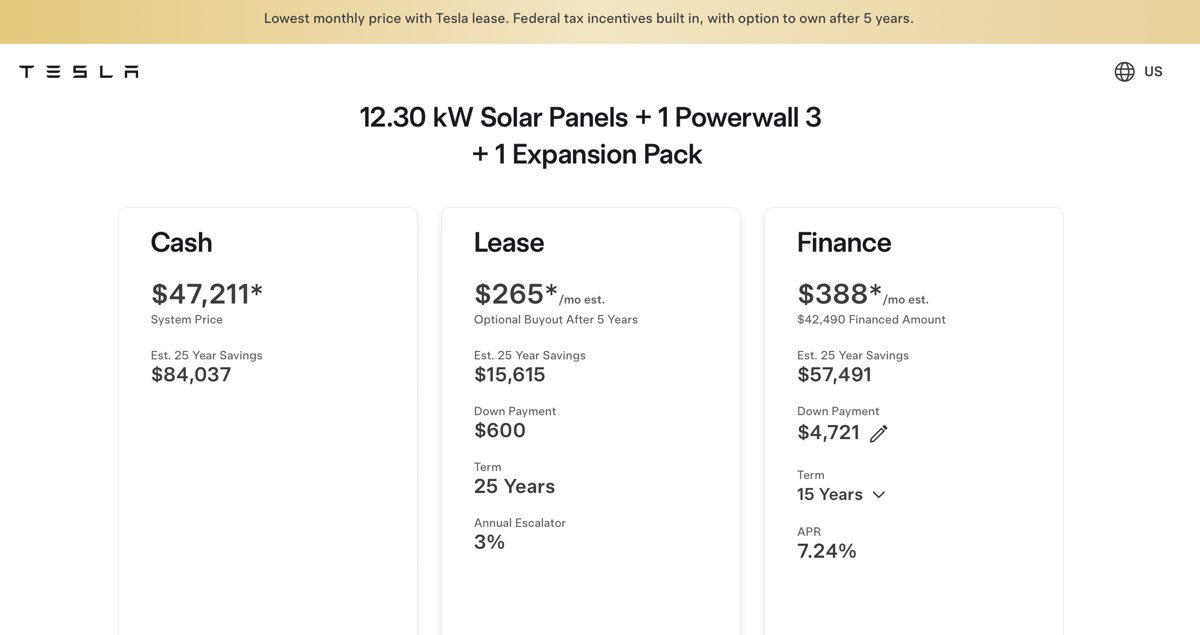
Tesla Energy "Compare Payment Types". reddit.com r/TeslaSolar -
Install date
- Change for HVAC
- Jetson's placement wins: the buyer picks a preferred install week before the deposit, which is the moment the whole thing feels real. The week is held, then confirmed after the site visit; the copy says so under the picker.
- Ask for
- A preferred week and a second choice. Morning or afternoon.
- Button
Where this comes from
Jetson's third promise, "3. Choose your install date", sits on the homepage next to "Switch in a day. One team. One price." (jetsonhome.com/us/how-it-works). Tesla schedules delivery after the order, as an app task ("Schedule delivery", walkthrough, 2025-05).
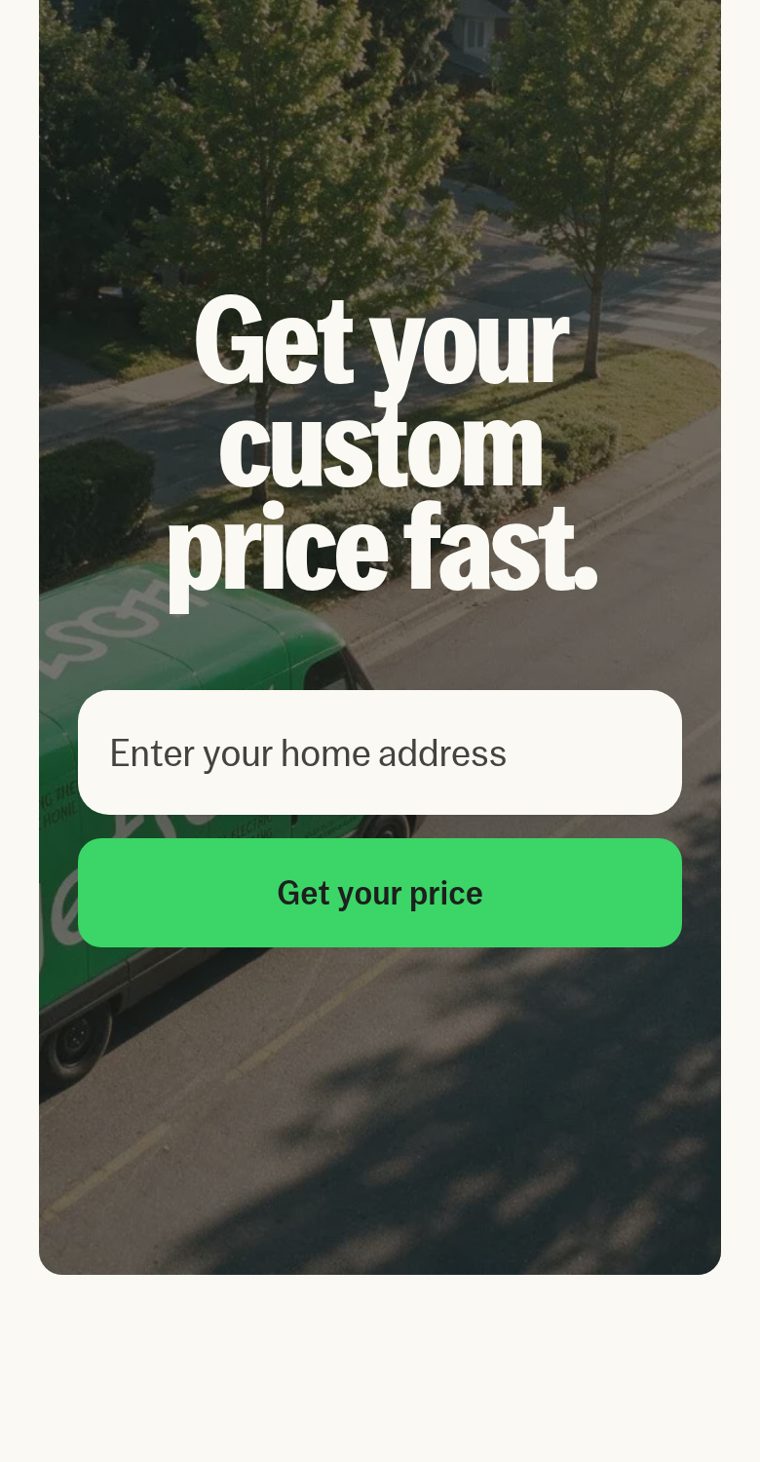
Jetson's closing address card, phone. jetsonhome.com/us/air -
Order summary and deposit
- Change for HVAC
- "Due today: $100, refundable until you approve the final design after the home visit. Your price can change if the visit finds something the photos did not: panel capacity, duct condition, line-set routing." Itemize every fee before the button (permit, disposal of the old unit, electrical). Going back is always allowed; "Approve design" gets a confirm dialog. The address from step one stays at the top of the rail as an editable chip, the way Tesla keeps the delivery location there.
- Ask for
- Nothing new. A read-back of every choice with an edit link per line.
- Button
Where this comes from
Tesla's summary is the bottom of the same rail, not a new page: itemized options, "Est. Purchase Price, includes destination and order fee", the payment line with its terms, "Sales Tax: Pending", then a bold Due Today. Energy's wording under it: "$100. Refundable deposit until you accept your design. Price is subject to change based on installation complexity." Tesla live, AX read, 27 Oct 2026: the sticky bottom bar carries the configuration summary ("Model Y · Rear-Wheel Drive · Stealth Grey · 18'' Aperture Wheels · All Black"), a "$526 /mo after est. savings" button that opens the breakdown, and the primary "Order Now"; the delivery location ("Boston, MA, 02125") is an editable chip at the top of the rail. Sources: The Weekly Driver, 2026-07, Electrek, 2025-10; (left panel).
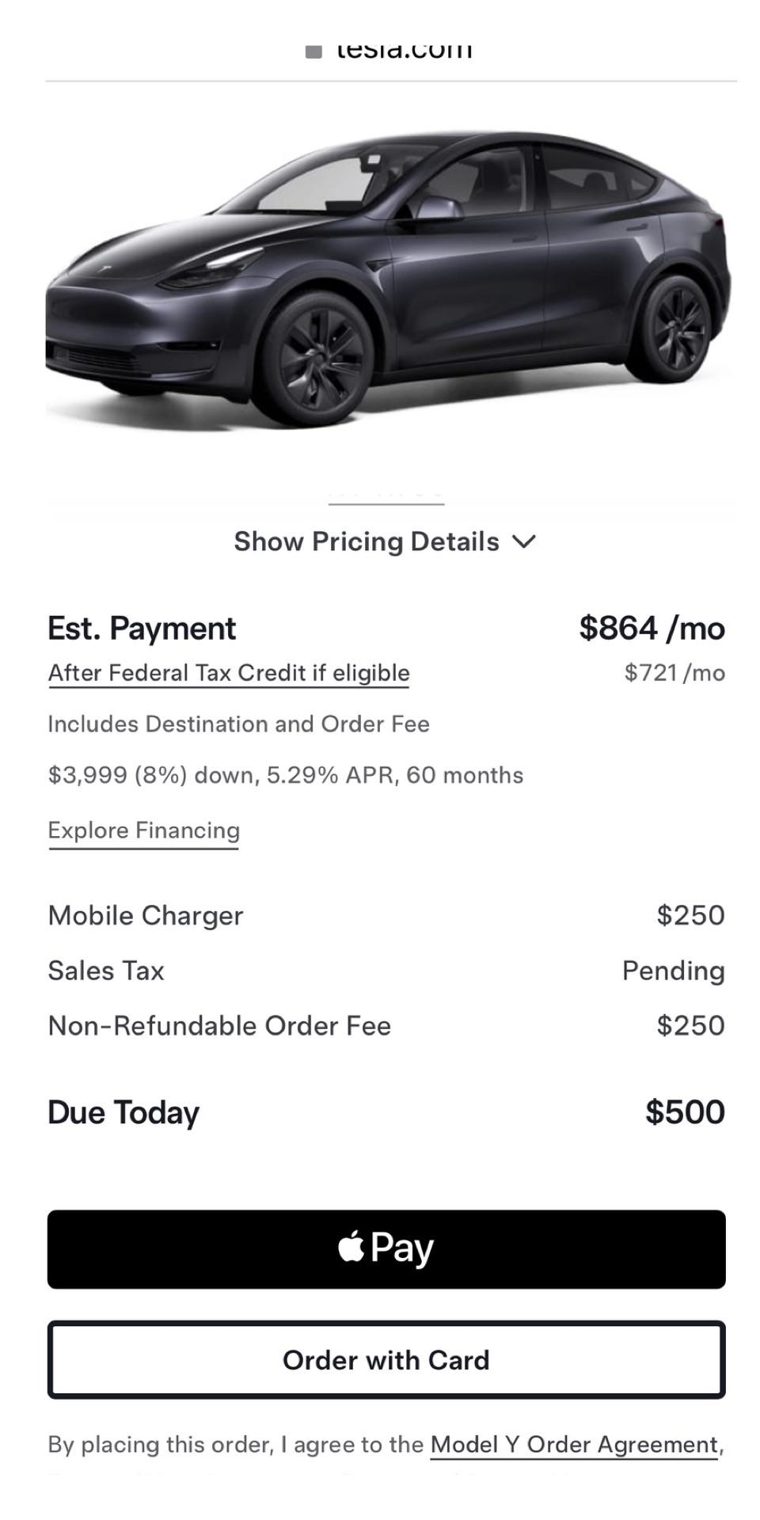
Model Y summary: fees itemized, Due Today, Apple Pay then card. reddit.com r/TeslaModelY -
Account, payment, then tasks
- Change for HVAC
- Account is created by the deposit, not before it. The task list after: photos of the nameplate, panel and ducts; the home visit; the financing application (only now); confirm the held week; final payment on install day. Each task shows what it unlocks.
- Ask for
- Name, email, phone, card or wallet, one agreement checkbox.
- Button
Where this comes from
Tesla: Apple Pay (black) or "Order with Card", then name, email, phone, card and one agreement checkbox, then "Place Order". Everything heavy moves to a numbered task list in the app ("Step 7 of 8, Final Payment"): registration, financing application, insurance, trade-in photos, delivery date, final payment. Sources: Model Y walkthrough, 2026-01, motorandwheels.com; flow.json Model Y steps 14 to 16.
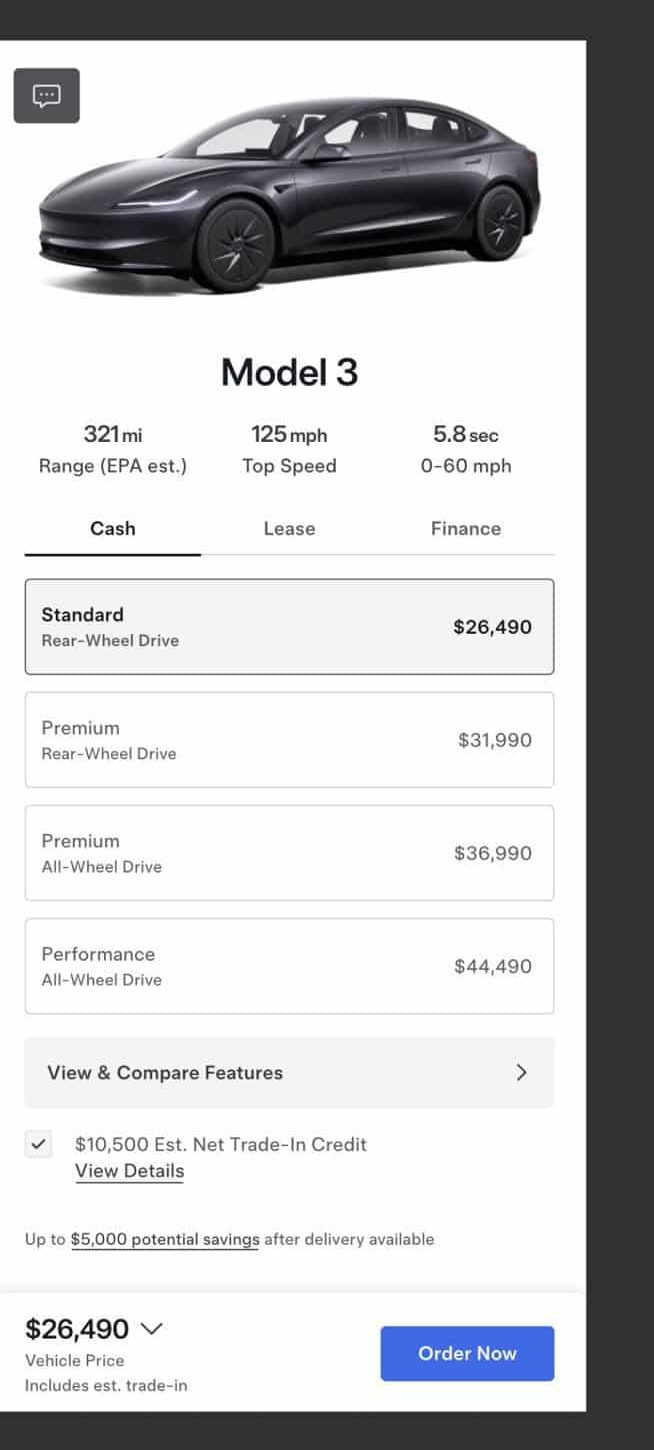
Tesla's inline trade-in credit, the model for "Get credit for your old system" as a later add. driveteslacanada.ca
Pattern catalogue
Every pattern in the flow maps to one named component. Order of search, per design-standard §6.1: React Bits, then 21st.dev, then a GSAP plugin; hand-build only with a written reason.
Install from the author's own registry where one exists (Origin UI, Motion Primitives, React Bits). Installing through 21st.dev itself needs a 21st API key we do not have; the free plan allows two copies a day. Every component is restyled to the one ink, the one accent, Oswald and the 8px grid before it ships (§6.1 rule 4), and sits behind one reduced-motion guard (§6.1 rule 3). Licences were read from each component page on 2026-10-27; entries marked check licence list "unknown" or "no-license" on 21st and are layout references only until the author confirms.
-
Address combobox
Step one. Jetson's Places field.
- Component
- Combobox by Abraham (Ark UI) on 21st.dev
- Licence
- Ark UI is MIT at source; the 21st listing says unknown. check licence on the demo wrapper only.
- Install
bun add @ark-ui/react, then the Combobox from ark-ui.com. Fallback:bunx shadcn@latest add "https://21st.dev/r/anubra266/combobox?api_key=$API_KEY_21ST"- Change
- One field, Places session token, suggestions listed as street then city in
--ink-2, the "Edit full address details" row as the Accordion below. The arrow button is the accent, 48px square.
-
Vertical progress rail
Every step. Jetson's five dots, this page's spine.
- Component
- Stepper, React Bits (vertical layout, gliding indicator). Static or non-React pages: Stepper with inline titles and descriptions, Origin UI.
- Licence
- React Bits: MIT + Commons Clause, free for our sites. Origin UI: MIT.
- Install
- Origin UI from originui.com/stepper
- Change
- Dots in the ink on a 1px hairline, no spring: Hint level means the indicator moves with a 200ms ease-out, and under reduced motion it jumps. Step names in Oswald caps labels.
-
Payment segmented control
Step six. Tesla's Cash | Lease | Finance tab group, Finance default (Tesla live, AX read, 27 Oct 2026).
- Component
- Animated Tabs, Motion Primitives (Julien Thibeaut), the Animated Background highlight the design standard names for Hint. Alternative without
motion: Segmented Control, halaska-studio. - Licence
- Both MIT.
- Install
bunx shadcn@latest add https://motion-primitives.com/c/animated-background.json- Change
- Track in
--ground-3, selected segment the accent fill with ground text, square corners, labels in Oswald caps. Switching re-prices every card on the screen at once (Tesla rule).
-
Down-payment slider
Step six. Tesla's "Edit terms".
- Component
- Slider, Origin UI (Radix slider with a value output). Not React Bits Elastic Slider: its rubber-band easing is on the §6.5 list.
- Licence
- MIT.
- Install
- From originui.com/slider (shadcn registry JSON per variant).
- Change
- Track in
--ground-3, filled range and thumb in the ink, the live value in Oswald tabular figures beside it. Term is a plain select, not a slider.
-
Live price figure
Steps three to eight. Tesla's instantly updating price.
- Component
- Number Flow, SmoothUI (Edu Calvo), rolling digits on the
number-flowpackage. React Bits Count Up is excluded: §6.5 bans counting on numbers that do not need it, and a price that changes needs a roll, not a count from zero. - Licence
- MIT.
- Install
bun add @number-flow/react, wrapper from smoothui.dev- Change
- Oswald, tabular numerals, no blur on the digits under reduced motion. Only the figure rolls; the terms line beneath it just changes.
-
Sticky price bar
Steps three to eight. Tesla's bottom bar: summary, price button, Order Now (Tesla live, AX read, 27 Oct 2026).
- Component
- Bottom Nav Bar, Arunachalam as the fixed shell, with Number Flow inside and the Accordion below for "Show pricing details". check licence (listed unknown); the shell is a 40-line
position: stickyblock if it fails. - Licence
- Unknown on 21st.
- Install
bunx shadcn@latest add "https://21st.dev/r/arunachalam/bottom-nav-bar?api_key=$API_KEY_21ST"- Change
- Ground fill, one hairline on top, no shadow, no blur. Left: figure and one terms line. Right: the one accent button. Never animated; it is the CTA (our motion rules).
-
Option cards (radio cards)
Steps three and four. Tesla's trim and package cards.
- Component
- Radio Group with grid, Origin UI. Richer alternative: Radio Group with Plan Cards, ShadcnSpace check licence.
- Licence
- Origin UI MIT.
- Install
- From originui.com/radio
- Change
- Selected state is a
--ground-3wash plus a check glyph, never an accent outline (frontend draft guard). Each card shows its own $/mo in the selected payment mode.
-
Add-on checklist
Step four. Tesla's accessories list.
- Component
- Checkbox, Origin UI in a list row with the price right-aligned.
- Licence
- MIT.
- Install
- From originui.com/checkbox
- Change
- 24px box, accent when checked, tabular price. The same checkbox is the incentive opt-in in step five (Tesla's "$3,500 Massachusetts Incentive · View Criteria", Tesla live, AX read, 27 Oct 2026) and the energy-savings opt-in.
-
Price lines and summary
Steps five and eight. Tesla's negative lines and "Sales Tax: Pending".
- Component
- Checkout Summary, astralyxdev: subtotal, discount, tax and shipping lines, with unknown charges shown as "calculated at next step" instead of a false zero.
- Licence
- MIT.
- Install
bunx shadcn@latest add "https://21st.dev/r/astralyxdev/checkout-summary?api_key=$API_KEY_21ST"(no author registry; 2 free copies a day)- Change
- Rebate lines carry the program name and a negative figure in the accent; two totals, "Price" and "After incentives"; "Sales tax: pending until the home visit".
-
Compare payments sheet
Step six. Tesla's three-column compare.
- Component
- Sheet, Sean Hello (bottom sheet on phone, side panel on desktop) check licence; inside it, three columns of the pane shown in the demo below.
- Licence
- Not stated on 21st; fallback is shadcn/ui Sheet (MIT).
- Install
bunx shadcn@latest add sheet- Change
- Ground fill, no blur backdrop (a plain 40% ink scrim), square corners, a close control top right and Escape to close.
-
Accordion
FAQ, "Show pricing details", "Edit full address". Steps one, five, eight. Jetson's expander, Tesla's chevron.
- Component
- Accordion, Origin UI
- Licence
- MIT.
- Install
- From originui.com/accordion
- Change
- Hairline between items, a plus that turns to a minus in the ink, no card frames. Height animates 200ms ease-out; under reduced motion it snaps.
-
Install week picker
Step seven. Jetson's "Choose your install date".
- Component
- Calendar [React Day Picker], date-picker variant, Origin UI
- Licence
- MIT.
- Install
- From originui.com/calendar
- Change
- Weeks, not days: a week row is one target, unavailable weeks dimmed. The held week shows as an accent fill, the second choice as a
--ground-3wash.
-
Trust strip
Step one. Jetson's "Trusted by 2,500+ homes, 4.9 stars" and the Google review.
- Component
- Testimonial, avatar group with trust label, PrebuiltUI check licence (layout reference; the strip is three spans and one SVG star).
- Licence
- Not stated on 21st.
- Install
- Hand-built from the layout: count, rating, one short quote, in Small, under the address card.
- Change
- No avatars, no logo wall. Ink text, one star glyph drawn as SVG, never the accent.
-
Number fields
Step two. Square feet, floors, zones.
- Component
- Number Field, coss (Base UI number field with step buttons).
- Licence
- MIT (coss.com components).
- Install
bunx shadcn@latest add https://coss.com/r/number-field.json- Change
- Square corners, 48px tall,
inputmode="numeric", unit in--ink-2inside the field. Fuel, ducts and existing AC are radio cards, not selects.
-
Photo upload
Step nine tasks. Jetson's "Upload a few photos".
- Component
- File Upload, multi-file dropzone, Ephraim Duncan check licence.
- Licence
- Not stated on 21st.
- Install
bunx shadcn@latest add "https://21st.dev/r/ephraimduncan/file-upload-1?api_key=$API_KEY_21ST"- Change
- Three named slots (nameplate, panel, ducts) each with an example line drawing in the ink, camera capture on phone. No dashed border: a
--ground-2field.
-
Express pay and card
Step nine. Tesla's Apple Pay then "Order with Card".
- Component
- Express Wallets, felipemenezes098: Apple Pay and Google Pay buttons with a card fallback. Listed no-license, so layout reference only; the real control is Stripe's Payment Element.
- Licence
- No licence on 21st. Do not copy its code.
- Install
bun add @stripe/stripe-js @stripe/react-stripe-js, Payment Element with wallets on- Change
- Wallet button first in the ink, then "Pay with card" as the secondary button, then the one agreement checkbox and the deposit copy from step eight.
-
Post-order task list
Step nine. Tesla's "Step 7 of 8" delivery tasks.
- Component
- The same Origin UI Stepper vertical, one row per task with its state. Reference for the panel-and-progress layout: Onboarding Checklist, Caio Bonato check licence.
- Licence
- Origin UI MIT.
- Install
- As the rail above.
- Change
- Each row names what it unlocks ("Photos: lets us confirm your price"). Done rows get a check glyph in the ink; the next one is the only accent on the screen.
-
Bill savings chart
Step five, opt-in. Tesla's with-and-without bars.
- Component
- Bar Chart, Intent UI (Recharts). Two bars: this year's bill with the old system, with the heat pump.
- Licence
- MIT (Intent UI).
- Install
bunx shadcn@latest add https://intentui.com/r/bar-chart.json- Change
- Two bars in
--ground-3and the ink, figures in Oswald above them, assumptions in a Small footnote (rate, degree days, fuel price), no grid lines, no tooltip.
-
Section rise on scroll
Every step below the first screen. The Hint-level quiet rise.
- Component
- Fade Content, React Bits (plain fade, not grain or mist). Static pages, as here: GSAP ScrollTrigger through
motion-boot.js. - Licence
- MIT + Commons Clause. GSAP free since 3.13.
- Install
bunx shadcn@latest add @react-bits/FadeContent-TS-TW- Change
- 24px rise, 0.6s, power3.out, once, never on anything in the first viewport and never on the CTA. One guard:
gsap.matchMedia()onprefers-reduced-motion: no-preference.
-
Trade-in credit sheet
A future add to step four. Tesla's inline "Get Trade-In Value".
- Component
- The Sheet above, with the Number Field for the old unit's age and the live figure. Pattern source: Drive Tesla Canada, 2025-11.
- Licence
- As above.
- Install
- As above.
- Change
- "Credit for your old system" with the footnotes Tesla uses: valid 7 days, subject to inspection. After Continue, every price drops by the credit and the bar says "Includes est. credit".
Visual language
One ground, one ink, one accent. One display family. An 8px grid. Motion with a job. A seal and a hairline for the Greek, and nothing classical near a button.
This is the Hint level of Jonathan’s design standard, chosen because the flow is a sales funnel (§2.3): the action wins, so the type does the Greek work and the only classical marks are the seal in the header and footer and the one hairline with dot terminals under the hero.
Colour
The accent appears on the primary button, on links and on the selected payment segment. Never as a fill behind text, never as a card outline, never past a tenth of a screen. Surfaces step in tone; nothing is outlined or lifted.
Spacing
- 4
- 8
- 16
- 24 · phone gutter
- 40
- 64
- 96 · between sections, phone
- 160 · between sections, desktop
Type
Price first.
Visit later.
Lead in the system sans at 21 → 26px.
Body at 17 → 19px, line height 1.55, at most 62 characters a line. Figures in Oswald with tabular numerals: $177 /mo
Motion, each with its job
- Carry the story on scroll: Lenis smooth scroll and one 24px rise per section below the first screen. That is the whole Hint allowance.
- Answer the hand: the segment control and every price re-price at once; the figure rolls, nothing else moves.
- Never: the sticky bar and its button, anything in the first viewport, text effects above the fold. Reduced motion renders everything in place; the page works with scripts off.
The Greek, at Hint
One seal: circle, crosshair, a laurel sprig, 32 to 48px in the ink, as the wordmark and the footer mark. One hairline with dot terminals as the divider after the hero. Construction lines are 1px at 45 to 60% ink and never carry text. No statue, no etching: at Hint the type is the Greek.
The price bar, working
Step six as a working fragment: three payment modes, one live monthly estimate, rebates netted as named lines, and the real price always shown next to the incentive price.
Sample figures for a 2.5-ton cold-climate system; replace with real pricing before any of this reaches a buyer.
$7,400 after incentives, paid in cash
Real price $14,900, installed. Rebates paid after install; the 25C credit comes back at tax time.
$88 /mo est., financed
$0 down, 7.49% APR, 120 months, on $7,400 after incentives · Edit terms
$89 /mo for 10 years, leased
Incentives captured by the owner and built into the payment. Maintenance and filters included. Buy-out option after year five.
| 2.5-ton cold-climate heat pump, Better tier, installed | $13,400 |
|---|---|
| Smart thermostat | $400 |
| Permit and old-unit disposal | $1,100 |
| Price | $14,900 |
| Federal 25C credit | −$2,000 |
| HEEHRA rebate, if eligible | −$4,000 |
| Xcel Energy rebate | −$1,500 |
| After incentives | $7,400 |
| Sales tax | Pending until the home visit |